

AI and Capture
Stepflows
Build guided product walkthroughs from screenshots with Stepflow AI, then publish and share.
A stepflow is a guided walkthrough for a product UI: useful for SOPs, onboarding, support playbooks, and feature demos. Learners follow annotated steps instead of reading a long prose tutorial.
Public stepflows live at /stepflows/{slug}. You manage them under Studio → Stepflows.
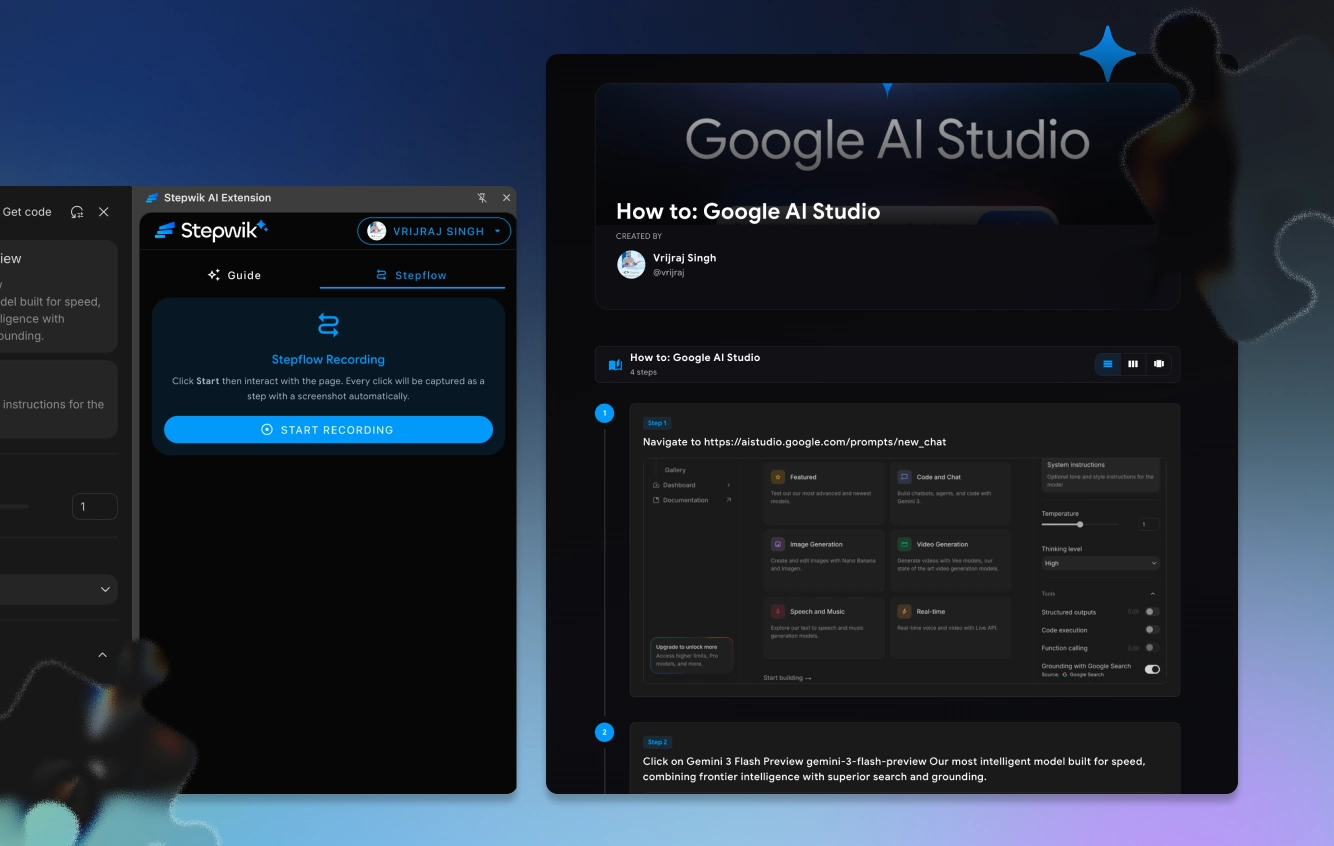
Stepflows complement AI lab generation: use Generate labs or the Chrome Extension when the source is docs or a README; use Stepflow AI when the source of truth is a click-path through a UI.
Stepflow AI
Stepflow AI helps turn a sequence of screenshots into draft steps:
Create a stepflow
Open Studio → Stepflows and create a new stepflow.
Capture or upload screenshots
Capture or upload screenshots of the flow in order.
Let AI draft steps
Let AI extract ordered steps and annotations.
Review in Studio
Review numbering, hotspots, and copy in Studio.
Publish
Set visibility and publish the stepflow.
Review checklist
- Step order matches the real click-path
- Hotspots point at the correct control
- Copy names UI labels exactly as shown in the product
- No leftover screenshots from an older product version
When to use a stepflow vs a lab
| Use a stepflow when… | Use a lab when… |
|---|---|
| The lesson is primarily UI navigation | Learners need code, terminals, or deep explanations |
| Screenshots are the source of truth | You are teaching concepts end to end |
| Support / SOP style guidance | Curriculum or public education content |
| You need a short click-path next to a longer tutorial | The primary artifact is multi-section reading |
Many teams use both: a lab for the full tutorial, and a stepflow for the click-path inside the product.
Visibility
Stepflows commonly support Public, Private, and Unlisted. Choose Unlisted for stakeholder review (Pro+), Public for open guides, and keep drafts unpublished while authoring. See Publish and share for plan limits on Unlisted/Private.
Tips
- Capture screenshots at a consistent viewport width
- Prefer the happy path first; add alternate paths as separate stepflows if they diverge early
- Update screenshots whenever UI chrome changes: stale hotspots confuse support teams
- Link related labs from the stepflow description when learners need deeper context