

Developers
MCP
Connect Cursor, VS Code, Claude, Windsurf, and other AI clients to Stepwik over the Model Context Protocol.
The Stepwik Model Context Protocol (MCP) server lets AI assistants search and manage Stepwik content from your editor, including drafting private labs and courses you finish and publish in Studio.
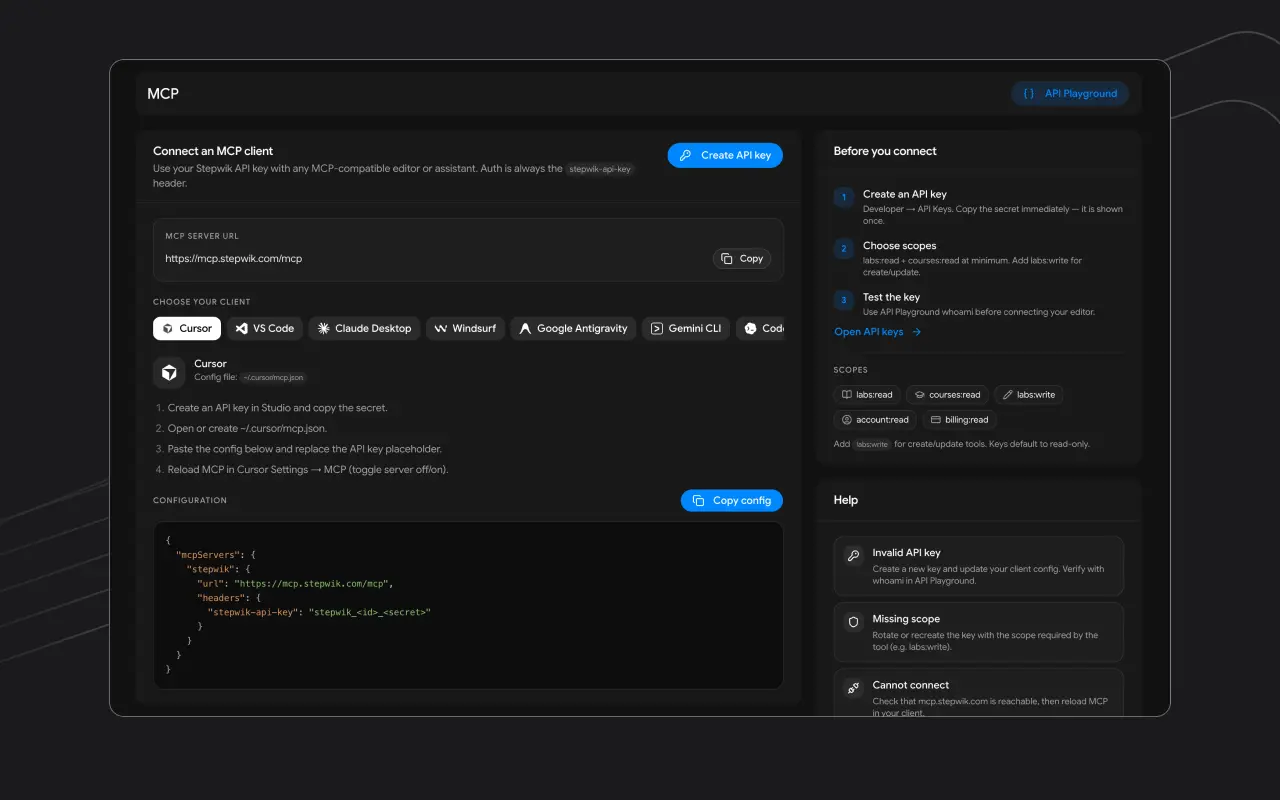
Endpoint
https://mcp.stepwik.com/mcpAuthenticate with:
stepwik-api-key: stepwik_<id>_<secret>Prerequisites
Create a Stepwik account
A Stepwik account (sign up if needed).
Create an API key
An API key (
labs:read/courses:readto start; add write scopes for drafts).Pick an MCP client
An MCP-capable client from the list below.
Client setup guides
| Client | Config style | Guide |
|---|---|---|
 Cursor Cursor |
mcpServers + url |
Cursor |
 VS Code VS Code |
servers + type: http |
VS Code |
 Claude Desktop Claude Desktop |
mcpServers + url |
Claude Desktop |
 Windsurf Windsurf |
mcpServers + url |
Windsurf |
 Google Antigravity Google Antigravity |
serverUrl |
Antigravity |
 Gemini CLI Gemini CLI |
httpUrl |
Gemini CLI |
 Codex Codex |
TOML mcp_servers |
Codex |
 OpenCode OpenCode |
mcp.remote |
OpenCode |
 Google Jules Google Jules |
Host editor MCP | Jules |
 Kimi Code Kimi Code |
mcpServers + url |
Kimi Code |
| Other | Streamable HTTP | Other clients |
Studio → Developer → MCP also shows copy-paste snippets for the same clients.
Personal vs organization
The API key chooses the workspace. For both contexts in one client, use separate servers:
https://mcp.stepwik.com/mcp?account=personal
https://mcp.stepwik.com/mcp?account=organization
OAuth clients
Some clients (for example Claude.ai) can connect without pasting a key. Authorize in the client, approve in Stepwik, and revoke from Connected apps.
What works well
whoamito confirm account / org context- Search public labs and courses
- List workspace labs
- Create or update private drafts, then open the Studio
draft_url
Tool catalog
MCP tool names still use codelab for labs (for example create_codelab). In Studio and the rest of the product docs, the same content is a lab. Prefer approved tags from list_tags; never invent tag labels.
Discovery (public, no write scopes)
| Tool | Params | Returns / notes |
|---|---|---|
get_stepwik_overview |
(none) | Platform overview and public lab index (llms.txt) |
list_tags |
q?, group? |
Approved tag catalog. Call before create/update. |
search_public_labs |
q?, tags?, page?, per_page? (max 50) |
Public published labs |
search_public_courses |
q?, tags?, page?, per_page? |
Public published courses |
get_public_lab |
slug |
Full public lab by slug |
get_public_course |
slug |
Full public course by slug |
get_public_stepflow |
slug |
Public stepflow by slug |
Account and workspace (API key)
| Tool | Scope | Params | Notes |
|---|---|---|---|
whoami |
valid key | (none) | User/org id, account type, key id, scopes |
list_my_organizations |
account:read |
(none) | Memberships (personal key) or key’s org |
get_billing_info |
billing:read |
(none) | Plan / billing summary for the key’s account |
list_my_labs |
labs:read |
q?, tags?, page?, per_page?, type? |
Workspace labs (type e.g. published / draft) |
list_my_courses |
courses:read |
q?, tags?, page?, per_page?, type? |
Workspace courses |
get_lab_metadata |
labs:read |
slug |
Lab metadata; prefer get_codelab for full markdown |
get_course_metadata |
courses:read |
slug |
Course metadata; prefer get_course for ordered labs |
Create and update drafts (API key)
| Tool | Scope | Required params | Important rules |
|---|---|---|---|
get_codelab_import_format |
labs:read / write flows |
(none) | Call before create_codelab for schema and writing guidelines |
create_codelab |
labs:write |
title, description_short, level, sections |
Private draft only. title 5–70 chars; description_short 25–160; level Beginner/Intermediate/Advanced; each section needs title, content, order; section content must start with ## matching the section title. Optional tags (max 5 from list_tags), duration, category. Always show returned draft_url. |
get_codelab |
labs:read |
slug |
Full owned/co-authored/org lab with markdown sections |
update_codelab |
labs:write |
slug |
Send only fields to change. To change body, send full sections array (read first with get_codelab). |
get_course_import_format |
courses:read / write flows |
(none) | Call before create_course |
create_course |
courses:write |
title, description_short, level, tags |
Private draft. tags min 1 max 10 from list_tags. Optional labs (slug or _id + order). Show draft_url. |
get_course |
courses:read |
slug |
Full course + ordered labs |
update_course |
courses:write |
slug |
Partial updates. To replace the path, send full labs array. |
Common failures
| Symptom | Likely cause | What to do |
|---|---|---|
| Auth / invalid token | Missing or wrong stepwik-api-key header |
Create an active key in Studio → Developer → API Keys; header name must be exact |
| Empty workspace / wrong org | Key bound to another account | Confirm with whoami; use ?account=personal or ?account=organization if you run two servers |
| Cannot create or update drafts | Missing labs:write / courses:write |
Add write scopes on the key and reconnect the client |
| Validation error on create | Title/description length, empty sections, or section markdown not starting with ## Title |
Call get_codelab_import_format / get_course_import_format and fix payload |
| Tag rejected | Invented tags | Call list_tags and pass returned labels or slugs only |
| Not found / no access | Wrong slug or no ownership | Use list_my_labs / search_public_*; org keys only see that org’s content |
| Rate limited | Freemium daily quota or burst caps | See API keys and API Playground |
| Expected publish via MCP | Publish is Studio-only | Open draft_url, polish, then publish |
What stays in Studio
Publishing, visibility, domain / branding, billing checkouts, and irreversible org admin actions stay in Studio, not MCP.
Rate limits
| Limit | Value |
|---|---|
| Freemium daily quota | 50 requests / UTC day |
| Paid plans | Unlimited daily quota |
| Burst | Per-route caps: see API Playground |
Troubleshooting
| Symptom | Check |
|---|---|
| Auth failures | Key active; header exactly stepwik-api-key |
| Empty workspace | Key matches the intended personal/org workspace |
| Cannot create drafts | Key has labs:write / courses:write |
| Stale after config change | Reload / reconnect MCP in the client |
| Rate limited | API keys limits |
Next steps
Set up Cursor
Add Stepwik to ~/.cursor/mcp.json and reload MCP in Settings.
Create an API key
Pick scopes, copy the secret once, and review plan rate limits.
Try the API Playground
Call the same Enterprise API routes MCP uses: with live responses.
Manage connected apps
Review or revoke OAuth grants for Claude.ai and similar clients.