
 Stepwik MCP
Connect your AI editor to Stepwik
Point Cursor, VS Code, Claude, or any MCP client at Stepwik. Search labs, draft new ones, and keep courses in sync — from the same place you write code.
Works with the clients you already use
 Cursor
 VS Code
 Claude Desktop
 Windsurf
 Gemini CLI
 Codex
Codex OpenCode
 Kimi Code
HTTP
Streamable MCP
API key
Header auth
10+
Clients
Scoped
Labs & courses
How it works
From API key to labs in your editor
One remote server, a scoped key, and the client you already use. No local MCP binary to maintain.
Create an API key
In Studio → Developer → API Keys. Copy the secret once, then choose scopes. labs:read and courses:read are enough to start.
Add Stepwik to your client
Paste the MCP server URL and stepwik-api-key header into Cursor, VS Code, Claude Desktop, or any Streamable HTTP client.
Search, read, and ship labs
Ask your assistant to find a lab, draft a new one from a repo, or update a course — without leaving the editor.
Who it's for
Enablement that lives next to the code
Maintainers, DevRel, and L&D teams use MCP so assistants can look up labs and ship updates without leaving the IDE.
Author from your IDE
Draft and refine labs in Cursor or VS Code while you still have the repo open. No context-switch to a browser form.
Look up what already exists
Search public and workspace labs before writing a duplicate. Assistants can read structure and reuse what works.
Keep courses in the loop
Create and update courses from the same MCP session so enablement stays next to the code that changed.
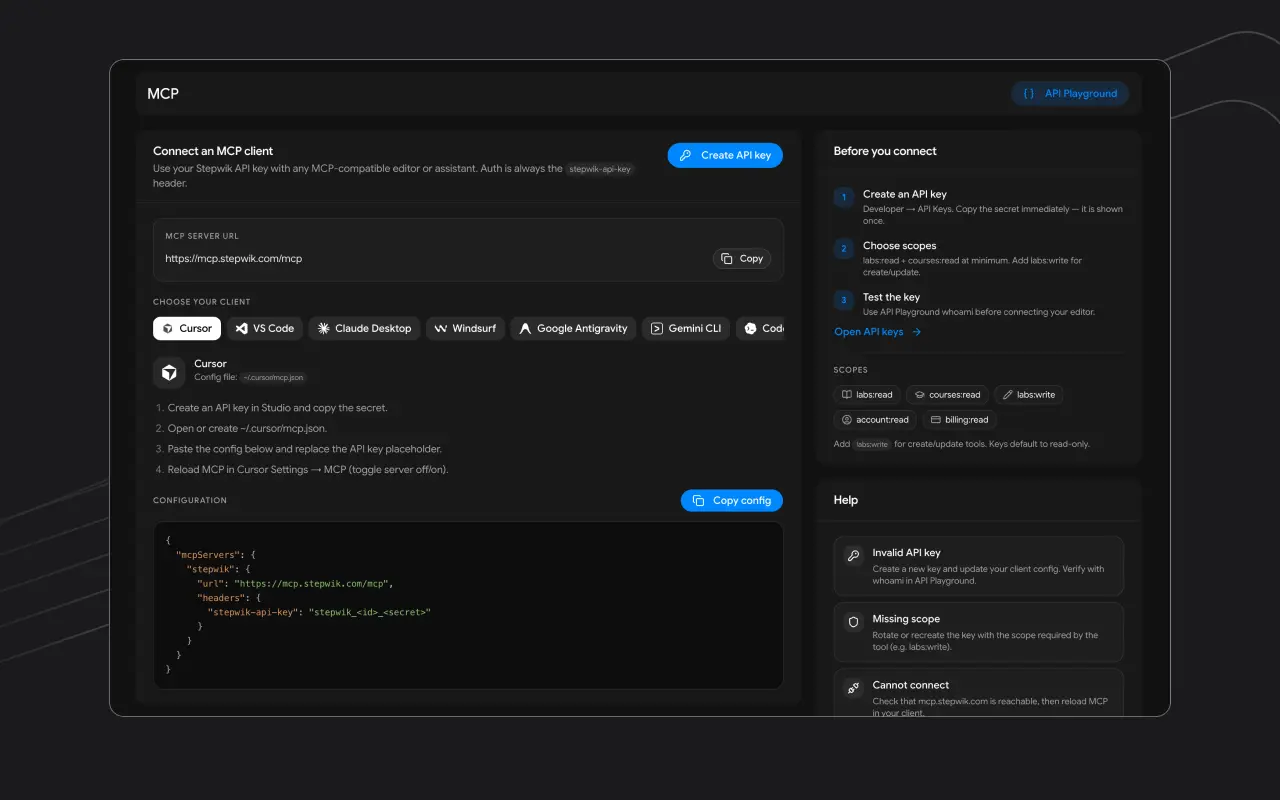
One config
Point any MCP client at Stepwik
Remote Streamable HTTP. Auth is always the stepwik-api-key header. Server URL: https://mcp.stepwik.com/mcp
- Create a key in Studio → Developer
- Paste config into ~/.cursor/mcp.json (or your client)
- Reload MCP and ask your assistant to search labs
{
  "mcpServers": {
    "stepwik": {
      "url": "https://mcp.stepwik.com/mcp",
      "headers": {
        "stepwik-api-key": "stepwik_<id>_<secret>"
      }
    }
  }
}
What you get
Your assistant, with Stepwik tools
Search labs and courses
Find public and workspace content by query so the assistant works from what you already published.
Create and update labs
Generate structured labs from the editor, then refine them in Studio. Add labs:write when you are ready to publish.
Courses in the same session
Read and assemble courses without a separate API client. One MCP server covers labs and curricula.
Scoped keys, not blanket access
Keys default to read-only. Grant labs:write only where create and update tools should run.
Remote HTTP, not a local binary
Point any Streamable HTTP MCP client at mcp.stepwik.com. Auth is always the stepwik-api-key header.
Works where your team already writes
Cursor, VS Code, Claude Desktop, Windsurf, Gemini CLI, Codex, OpenCode, and other MCP hosts.
FAQ
Common questions
Next step
Give your editor a Stepwik account.
Create an API key, paste the MCP config, and start searching or shipping labs from Cursor, VS Code, or Claude.